Pages

Showing posts with label SQL Tutorials. Show all posts

20 March 2014

SQL- Learn to upload flat file into SQL Server 2008 step by step :


Step 1: Following below is the sample flat file which need to be uploaded in SQL Server.


Flat File
Step 2: Open SQL Server 2008 and go to Database -->System Databases --> tempdb and then right click on the tempdb and go to Tasks --> Import Data


Step 3: On clicking Import Data as shown in previous step, SQL Server Import Export Wizard pops up. Click Next.
SQL Import Export Wizard
Step4 : On Clicking NEXT another window pops up. Do the following below and as shown in pic:
            Select the Data Source as "Flat File Source"
            Browse the Flat file.
            Set Header Row delimeter as "Tab"(depends how your flat file is delimited)
            Tick the check box if first row of flat file contains column names.

22 December 2013

SQL- NULL Functions

1. ISNULL() : 

Syntax:
ISNULL ( check_expression , replacement_value )
It replaces the NULL value with replacement value. If the Check_expression evaluates to NULL then it is replaced with the replacement value else the value of Check_expression is returned.
ISNULL function can be used both in SQL SERVER and MSAccess
Let's understand with examples: Consider a below table SalesInfo for illustrations:
SELECT * FROM SalesInfo


We see that some of the products has not been sold . This is is evident as we can see there are NULL in QuantitySold column. Now,for better understanding we want  to display zero insteadof  NULL in QuantitySold column,we can do this by using ISNULL function.

SELECT ProductId,ProductName,Price,
ISNULL(QuantitySold,0)
FROM SalesInfo


Suppose we want to calculate, sales per item. For this we need to multiply the unit price and QuantitySold. If the Quantity sold is NULL, we can not get the correct result because multiplication of any number with NULL is always NULL. In such scenario, ISNULL() function is very useful. We can easily replace all NULL values with zero using ISNULL() function.

SELECT ProductName,
Price*(ISNULL(QuantitySold,0))AS SalePerItem
FROM SalesInfo


2. NVL() :

Syntax:
NVL( check_expression , replacement_value )
Just like ISNULL function in SQL SERVER, we have NVL function in ORACLE. It replaces the NULL value with replacement value. If the Check_expression evaluates to NULL then it is replaced with the replacement value else the value of Check_expression is returned.
This function holds the same explaination as that of ISNULL function.
SQL> SELECT ProductId,ProductName,Price,NVL(QuantitySold,0)
   2      FROM SalesInfo;

NOTE: IFNULL performs the same function as ISNULL () and NVL()
in Mysql database.

3. COALESCE():
 Syntax:
 COALESCE(Expression1, Expression2[,Expression3.........ExpressionN)
It returns the first non null value among its arguments.
Let us understand from the 'TelephoneRecords' Table.
SELECT * FROM TelephoneRecords

We want to display the Name and Mobile number of each person. For displaying the mobile number, Primary No should be displayed. If the Primary number is not available then Alternate No should be displayed.If Alternate No is not available then Office No should be displayed. For such a scenario, COALESCE function will serve our purpose as it always returns the first non null value.


SELECT Name,
COALESCE(PrimaryNo,AlternateNo,OfficeNo)
AS MobileNo
FROM TelephoneRecords


NOTE: If all the arguments in COALESCE function returns NULL then output will also be NULL.

It can also work similar to ISNULL function.

SELECT Name,COALESCE(PrimaryNo,0) 
AS MobileNo
FROM TelephoneRecords


We see that all NULL values replaced with zero.

9 September 2013

SQL- String Functions

  
SQL String functions are built in functions. It is deterministic in nature which means that it always  produces the same result when particular or specific input is provided under same state of database. String functions helps in manipulating string operations.

1.ASCII: It returns the ASCII code of the extreme left character in a character expression or string.

Syntax:
ASCII( Character expression )

Examples:
SELECT ASCII('A') AS
--65
SELECT ASCII('B'AS B
--66
SELECT ASCII('S'AS S
--83
SELECT ASCII('SUNIL'AS SUNIL
--83


ASCII Illustrations
2.CHAR: It converts ASCII code value to character.


Syntax:
CHAR( numeric expression )

Examples:
SELECT CHAR('65'AS 
--A
SELECT CHAR('66'AS B
--B
SELECT CHAR('83'AS S
--S


NOTE: Numeric expression should be in between 0 and 255. If it is not within this range, NULL value will be returned.

SELECT CHAR(257)
-- NULL

3.CHARINDEX: It returns the starting position of the character expression present in another character expression. Basically it takes three arguments. The first argument is the character expression which need to be searched ,The second argument is the character expression in which the expression to be searched. The third argument is optional. It tells the starting position at which the search will begin.

Syntax:
CHARINDEX( character expression1, character expression2 [, starting position])

Examples:

SELECT CHARINDEX('IT','IT JUNCTION 4 ALL IT PEOPLE')
--1

SELECT CHARINDEX('IT','IT JUNCTION 4 ALL IT PEOPLE', 2 )
--19


4. LEFT: It returns specified number of characters from left part of the character expression. It takes two arguments. First argument is the string or character expression. Second argument is numeric expression which tells how many characters to be extracted from left.

Syntax:
LEFT( character expression , numeric expression )

Examples:

SELECT LEFT('Sunil',3) AS LEFT_Demo
-- Sun

--Declaring local variable of VARCHAR type
DECLARE @Name VARCHAR(50)
--Assigning value to the local variaible
SET @Name = 'Sunil Kumar'
--Using LEFT function to extract First Name
SELECT LEFT(@Name, CHARINDEX(' ', @Name) - 1) AS [FirstName]
--Sunil


5. RIGHT : It returns specified number of characters from right part of the character expression. It takes two arguments. First argument is the string or character expression. Second argument is numeric expression which tells how many characters to be extracted from right.

Syntax:
RIGHT( character expression , numeric expression )

Examples:

SELECT RIGHT('Sunil',3) AS RIGHT_Demo
-- nil

--Declaring local variable of VARCHAR type
DECLARE @Name VARCHAR(50)
--Assigning value to the local variaible
SET @Name = 'Sunil Kumar'
--Using RIGHT function to extract Last Name
SELECT RIGHT(@Name, CHARINDEX(' ', @Name) -1) AS [LastName]
--Kumar


6.REVERSE: REVERSE function reverse the string. It takes only one argument which is the string which need to be reversed.

Syntax:
REVERSE(String )


Examples:
SELECT REVERSE('IT JUNCTION 4 ALL')
--LLA 4 NOITCNUJ TI

DECLARE @Name VARCHAR(100) = 'Sunil Kumar Gupta'
SELECT RIGHT(@Name, CHARINDEX(' ', REVERSE(@Name)) - 1) AS [LastName]
GO
--Gupta

DECLARE @CheckPalindrome VARCHAR(100) = 'Malayalam'
SELECT CASE WHEN @CheckPalindrome=REVERSE(@CheckPalindrome)
       THEN 'YES'
       ELSE 'NO' END AS CheckPalindrome
GO
--YES


7. LEN: It returns the number of characters in a character expression. It takes character expression or string as an argument. Leading space (space that appears at the start of the string ) is taken into consideration while trailing space (space that appears at the end of the string )is ignored.

Syntax:
LEN( character expression )

Examples:
SELECT LEN('Sunil') AS LEN_Demo1
--5
SELECT LEN('     Sunil') AS LEN_Demo2
--10
SELECT LEN('Sunil     ') AS LEN_Demo3
--5
SELECT LEN('Sunil Kumar') AS LEN_Demo4
--11


8. REPLACE: It replaces all the occurrences of a specified pattern of string with desired string  in another string. It takes three arguments. The first argument  is the source string. The second argument is the string which is to searched in source string and the third is the replacement string .


Syntax:
REPLACE( source string expression , search string , replacement string)

Examples:
SELECT REPLACE('XYZABCXYZABC','XYZ','ABC') AS REPLACE_Demo1
--ABCABCABCABC

SELECT REPLACE('Sea fish are found in sea','sea','River') AS REPLACE_Demo2
--River fish are found in River


9. STUFF: It deletes specified length of characters in the source string at the specified  position and inserts another string at the specified position.


Syntax:
STUFF( source string expression ,length, start position, string)

Examples:

SELECT STUFF('Sunil Kumar',3,3,'man') AS STUFF_DEMO
--Suman Kumar

DECLARE @Date VARCHAR(20)
SET @Date = '20071988'
SELECT STUFF(STUFF(@Date,3,0,'/'),6,0,'/') AS [DD/MM/YYYY]
--20/07/1988

DECLARE @Time VARCHAR(20)
SET @Time = '1120'
SELECT STUFF(@Time,3,0,':') AS [HH:MM]
--11:20


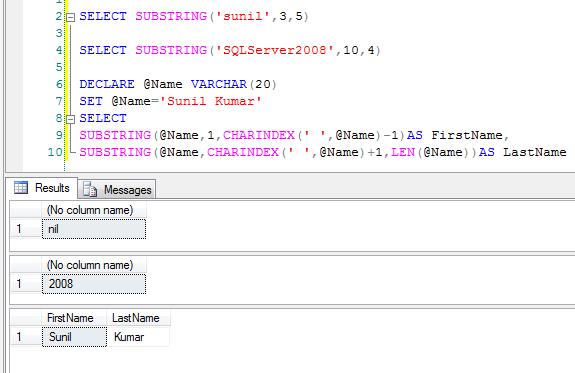
10. SUBSTRING: It returns the part of the string. It takes three arguments. First argument is the source string or character or text. Second argument is the start position from where string will be returned. Third argument is the length which tells how many character to be returned from start position.


Syntax:
SUBSTRING( source string expression , start position, length)

SELECT SUBSTRING('sunil',3,5)
--nil SELECT SUBSTRING('SQLServer2008',10,4)
--2008 DECLARE @Name VARCHAR(20)
SET @Name='Sunil Kumar'
SELECT 
SUBSTRING(@Name,1,CHARINDEX(' ',@Name)-1)AS FirstName,
SUBSTRING(@Name,CHARINDEX(' ',@Name)+1,LEN(@Name))AS LastName


11. RTRIM: RTRIM function removes the trailing spaces or blanks from the  string or character expression.

Syntax:
RTRIM( string expression )

Examples:
SELECT RTRIM('Sunil Kumar   ')
--Sunil Kumar

DECLARE @string_2_trim varchar(100);
SET @string_2_trim = 'At the end this sentence,six spaces are there.      ';

SELECT @string_2_trim + ' Starting with next string.';
--At the end this sentence,six spaces are there.       Starting with next string.


SELECT RTRIM(@string_2_trim) + ' Starting with next string.';
--At the end this sentence,six spaces are there. Starting with next string.


12. LTRIM LTRIM function removes the leading spaces or blanks from the  string or character expression.

Syntax:
LTRIM( string expression )

Examples:
SELECT LTRIM('     Sunil Kumar')
--Sunil Kumar

DECLARE @string_2_trim varchar(100);
SET @string_2_trim = 'First string without any space.';

SELECT @string_2_trim +'      Second string with six space in beginning.';
--First string without any space.      Second string with six space in beginning.

SELECT @string_2_trim +LTRIM('      Second string with six space in beginning.');

--First string without any space.Second string with six space in beginning.


13. SPACE: SPACE function returns string of repeated spaces. It takes integer expression  as the argument which indicates number of spaces .

Syntax:
SPACE( integer expression )


Examples:
SELECT 'Sunil'+'Kumar'
--SunilKumar
SELECT 'Sunil'+SPACE(1)+'Kumar'
--Sunil Kumar

SELECT 'Hello'+SPACE(2)+'How'+SPACE(1)+'are'+SPACE(1)+'you'+SPACE(1)+'?'
--Hello  How are you ?


14.UPPER: UPPER converts all lower case characters into upper case characters in a string.

Syntax:
UPPER( String )


Examples:

SELECT UPPER('sunil kumar')
--SUNIL KUMAR


SELECT UPPER('Sunil Kumar')
--SUNIL KUMAR


15.LOWER: LOWER converts all upper case characters into lower case characters  in a string.

Syntax:
LOWER( String  )


Examples:
SELECT LOWER('SUNIL KUMAR')
--sunil kumar


SELECT LOWER('Sunil Kumar')
--sunil kumar


16.REPLICATE: REPLICATE repeats string or character expression specified number of times.

Syntax:
REPLICATE(String,integer )


Examples:
SELECT REPLICATE('Sunil',4)
--SunilSunilSunilSunil


17.PATINDEX: PATINDEX returns the starting position of first occurrence of specified pattern in specified string. If the pattern is not found, zero is returned.
     If you want to search particular pattern use '%' before and after the pattern. If you want pattern to be your first characters in the string or in a column, do not give '%'character in the beginning of the pattern. If you want pattern to be your last characters in the string or in a column, do not give '%'character in the end of the pattern.
    Both CHARINDEX and PATINDEX is used to find the starting position of the first occurrence of pattern in a string. Both takes two arguments . The difference which lies between them is that we can use wildcard characters in pattern in PATINDEX but we can not use wildcard characters in CHARINDEX.

Syntax:
PATINDEX('%patteren_to_search%',string)


Examples:
SELECT PATINDEX('%NCT%','SUNIL IT JUNCTION 4 ALL SUNIL')
--12
SELECT PATINDEX('%SUNIL%','SUNIL IT JUNCTION 4 ALL SUNIL')
--1
SELECT PATINDEX('SUNIL%','SUNIL IT JUNCTION 4 ALL SUNIL')
--1
SELECT PATINDEX('%SUNIL','SUNIL IT JUNCTION 4 ALL SUNIL')
--25


26 August 2013

SQL- Shortcut way to delete duplicate records from a table

I have discussed earlier in one of my post how to delete duplicate records from a table . But recently i came up with even shorter way to delete duplicate records.

Consider a StudentInfo Table as shown  below for demonstration.

SELECT * FROM StudentInfo


StudentInfo Table
Step1:
 First we will create a temporary table '#temp' with same structure  as that of original table 
'StudentInfo' and insert all distinct rows from the 'StudentInfo' table into temporary table as follows:

19 August 2013

SQL- Temporary table in SQL SERVER

Temporary table in SQL SERVER


Temporary table: We create temporary table for temporary storing of data as the name suggests. It is very similar to normal tables and one can perform all operations on temporary 
table.Temprory tables are created inside tempdb database.The lifetime or the scope of 
the temporary table is limited.There are two kinds of temporary table which are as 
follows:

Local temporary table: It is prefixed with # to the table name.It is visible  only to the one who has created it till the session  exists. Table gets automatically deleted when the user log out from the session. The user can also explicitly drop the temporary table by using DROP command.
   Following below query shown is an example to create local temporary  table.

Creating Local Temporary Table

CREATE TABLE #Temp
(
  ID INT,
  Name VARCHAR(30),
  Age INT

  )

Inserting values into Local Temporary Table

INSERT INTO #Temp VALUES(1,'Sunil',24)
INSERT INTO #Temp VALUES(2,'Shweta',22)
INSERT INTO #Temp VALUES(3,'Rohit',25)
INSERT INTO #Temp VALUES(4,'Sohan',21)
INSERT INTO #Temp VALUES(5,'Mohan',21)

Let us see the data in #temp

6 August 2013

SQL-JOIN

         When we want to fetch data from two or more than two tables then we go for joins. Basically JOIN is an operation which combines results from two or more tables. We apply JOINS on related tables. JOINS are classified as below:


  •                EQUI JOIN / INNER JOIN
  •                OUTER JOIN                         

                                         LEFT OUTER JOIN
                                         RIGHT OUTER JOIN     
                                         FULL JOIN

  •                 SELF JOIN 
  •                 CROSS JOIN 


 INNER JOIN 

         INNER JOIN is also known as EQUI JOIN. It combines the data from two or more tables based on the JOIN conditions. It displays all the matching records and eliminates all non matching records. 

Let us consider below two tables for illustrations.

CustomerInfo Table


CustomerInfo Table

 ProdctInfo Table


ProductInfo Table
             Now , we will make a inner join between CustomerInfo Table and ProductInfo Table by writing the following below query.

4 August 2013

Ranking function in SQL SERVER

          Ranking function helps in ranking each row after partitioning has been done.Numbering depends upon the function which is used and some rows may receive the same value as other.Rank functions are non deterministic in nature. It proves to be very useful when we need our result set to be numbered sequentially.
        Firstly, the result sets produced by FROM clause are partitioned based on the column name mentioned in the PARTITION BY expression . PARTITION BY expression is optional and if the same is absent , the function assumes all rows of the result set as a single group. Once the partition has been done , ODER BY clause orders the rows within the partition and then any ranking is applied.
      There are four RANKING functions which are discussed in detail in coming paragraph. We will be demonstrating the RANKING function with and without the use of PARTITION BY expression.Consider the below 'MarksInfo' table for illustration.


MarksInfo Table


ROW_NUMBER(): It simply Returns the sequential number of the row order by specified column.


 Syntax:ROW_NUMBER() OVER([PARTTION BY <ColumnName>] ORDER BY <ColumnName>)

A. With use of PARTITION BY clause