Pages

18 November 2013

SQL- Scenario Based Questions PART- 1

SQL- Scenario based questions Part 1.

                                   Now the recruiters are setting a new trend by asking a scenario based questions in an interview.  Keeping in this mind, we have come up with many standard scenario based questions.

Scenario: You have been given the following Table "Annualhike". This table contains the name of employee, salary, designation, CRR and the increment. You have to test the increment column of the table based on the below logic:

  • Employee gets an increment of 15% of Salary if he/she gets CRR 1+.
  • Employee gets an increment of 10% of Salary if he/she gets CRR 1.
  • Employee gets an increment of 5% of Salary if he/she gets CRR 2.

You have to find out the records if there are any incorrect population in Increment field.

SELECT * FROM Annualhike


Solution

Method1

SELECT * FROM Annualhike A 
WHERE Increment <> (SELECT CASE WHEN A.CRR='2' 
                      THEN .05* SalaryPackage
      WHEN A.CRR='1'  THEN .1* SalaryPackage
      WHEN A.CRR='1+' THEN .15* SalaryPackage  
      END AS Increment)


Method 2

SELECT * FROM Annualhike
EXCEPT
SELECT Employee,SalaryPackage,Designation,CRR ,
              CASE WHEN CRR='2' THEN .05* SalaryPackage
                         WHEN CRR='1' THEN .1* SalaryPackage
                         WHEN CRR='1+' THEN .15* SalaryPackage  
              END AS Increment
 FROM Annualhike


For other SQL Scenario Based Questions, please visit below link
http://itjunction4all.blogspot.com/2015/05/sql-scenario-based-questions-part-3.html

6 November 2013

SQL- Displaying all records from a table for last one year

Q. How to find all the records from a table for last one year ?

       A table named "Transactions" has the following transaction details.

Transactions
Suppose, we have to find all the records which has been transacted in the last one year. For this scenario we will make use of date field which is "DateOfTransaction" .The following below query in SQL Server will fetch the required results.


SELECT * FROM TRANSACTIONS 

WHERE DateOfTransaction > DATEADD(YYYY,-1,GETDATE())


Suppose we have to get total amount spent by each ID in last one year. The following below query will fetch the desired results.

SELECT ID,SUM(Amount) AS TotAmount FROM TRANSACTIONS 
WHERE DateOfTransaction > DATEADD(YYYY,-1,GETDATE())
GROUP BY ID


Similar scenario can be handled in ORACLE with slight changes in query.We will have to to use ADD_MONTHS instead of DATEADD and SYSDATE instead of GETDATE().

SELECT * FROM TRANSACTIONS
WHERE dateOftransaction > ADD_MONTHS(SYSDATE,-12);

SELECT ID,SUM(Amount) TotAmount FROM TRANSACTIONS
WHERE DateOfTransaction > ADD_MONTHS(SYSDATE,-12)
GROUP BY ID;


9 September 2013

SQL- String Functions

  
SQL String functions are built in functions. It is deterministic in nature which means that it always  produces the same result when particular or specific input is provided under same state of database. String functions helps in manipulating string operations.

1.ASCII: It returns the ASCII code of the extreme left character in a character expression or string.

Syntax:
ASCII( Character expression )

Examples:
SELECT ASCII('A') AS
--65
SELECT ASCII('B'AS B
--66
SELECT ASCII('S'AS S
--83
SELECT ASCII('SUNIL'AS SUNIL
--83


ASCII Illustrations
2.CHAR: It converts ASCII code value to character.


Syntax:
CHAR( numeric expression )

Examples:
SELECT CHAR('65'AS 
--A
SELECT CHAR('66'AS B
--B
SELECT CHAR('83'AS S
--S


NOTE: Numeric expression should be in between 0 and 255. If it is not within this range, NULL value will be returned.

SELECT CHAR(257)
-- NULL

3.CHARINDEX: It returns the starting position of the character expression present in another character expression. Basically it takes three arguments. The first argument is the character expression which need to be searched ,The second argument is the character expression in which the expression to be searched. The third argument is optional. It tells the starting position at which the search will begin.

Syntax:
CHARINDEX( character expression1, character expression2 [, starting position])

Examples:

SELECT CHARINDEX('IT','IT JUNCTION 4 ALL IT PEOPLE')
--1

SELECT CHARINDEX('IT','IT JUNCTION 4 ALL IT PEOPLE', 2 )
--19


4. LEFT: It returns specified number of characters from left part of the character expression. It takes two arguments. First argument is the string or character expression. Second argument is numeric expression which tells how many characters to be extracted from left.

Syntax:
LEFT( character expression , numeric expression )

Examples:

SELECT LEFT('Sunil',3) AS LEFT_Demo
-- Sun

--Declaring local variable of VARCHAR type
DECLARE @Name VARCHAR(50)
--Assigning value to the local variaible
SET @Name = 'Sunil Kumar'
--Using LEFT function to extract First Name
SELECT LEFT(@Name, CHARINDEX(' ', @Name) - 1) AS [FirstName]
--Sunil


5. RIGHT : It returns specified number of characters from right part of the character expression. It takes two arguments. First argument is the string or character expression. Second argument is numeric expression which tells how many characters to be extracted from right.

Syntax:
RIGHT( character expression , numeric expression )

Examples:

SELECT RIGHT('Sunil',3) AS RIGHT_Demo
-- nil

--Declaring local variable of VARCHAR type
DECLARE @Name VARCHAR(50)
--Assigning value to the local variaible
SET @Name = 'Sunil Kumar'
--Using RIGHT function to extract Last Name
SELECT RIGHT(@Name, CHARINDEX(' ', @Name) -1) AS [LastName]
--Kumar


6.REVERSE: REVERSE function reverse the string. It takes only one argument which is the string which need to be reversed.

Syntax:
REVERSE(String )


Examples:
SELECT REVERSE('IT JUNCTION 4 ALL')
--LLA 4 NOITCNUJ TI

DECLARE @Name VARCHAR(100) = 'Sunil Kumar Gupta'
SELECT RIGHT(@Name, CHARINDEX(' ', REVERSE(@Name)) - 1) AS [LastName]
GO
--Gupta

DECLARE @CheckPalindrome VARCHAR(100) = 'Malayalam'
SELECT CASE WHEN @CheckPalindrome=REVERSE(@CheckPalindrome)
       THEN 'YES'
       ELSE 'NO' END AS CheckPalindrome
GO
--YES


7. LEN: It returns the number of characters in a character expression. It takes character expression or string as an argument. Leading space (space that appears at the start of the string ) is taken into consideration while trailing space (space that appears at the end of the string )is ignored.

Syntax:
LEN( character expression )

Examples:
SELECT LEN('Sunil') AS LEN_Demo1
--5
SELECT LEN('     Sunil') AS LEN_Demo2
--10
SELECT LEN('Sunil     ') AS LEN_Demo3
--5
SELECT LEN('Sunil Kumar') AS LEN_Demo4
--11


8. REPLACE: It replaces all the occurrences of a specified pattern of string with desired string  in another string. It takes three arguments. The first argument  is the source string. The second argument is the string which is to searched in source string and the third is the replacement string .


Syntax:
REPLACE( source string expression , search string , replacement string)

Examples:
SELECT REPLACE('XYZABCXYZABC','XYZ','ABC') AS REPLACE_Demo1
--ABCABCABCABC

SELECT REPLACE('Sea fish are found in sea','sea','River') AS REPLACE_Demo2
--River fish are found in River


9. STUFF: It deletes specified length of characters in the source string at the specified  position and inserts another string at the specified position.


Syntax:
STUFF( source string expression ,length, start position, string)

Examples:

SELECT STUFF('Sunil Kumar',3,3,'man') AS STUFF_DEMO
--Suman Kumar

DECLARE @Date VARCHAR(20)
SET @Date = '20071988'
SELECT STUFF(STUFF(@Date,3,0,'/'),6,0,'/') AS [DD/MM/YYYY]
--20/07/1988

DECLARE @Time VARCHAR(20)
SET @Time = '1120'
SELECT STUFF(@Time,3,0,':') AS [HH:MM]
--11:20


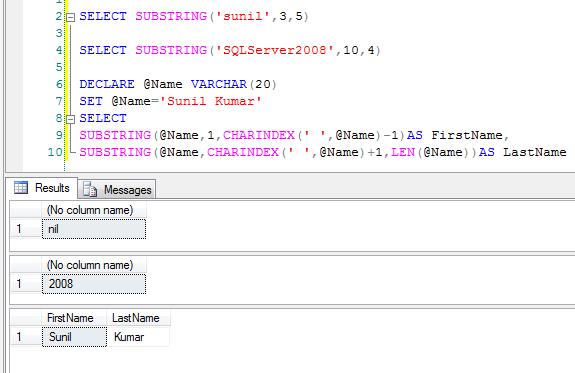
10. SUBSTRING: It returns the part of the string. It takes three arguments. First argument is the source string or character or text. Second argument is the start position from where string will be returned. Third argument is the length which tells how many character to be returned from start position.


Syntax:
SUBSTRING( source string expression , start position, length)

SELECT SUBSTRING('sunil',3,5)
--nil SELECT SUBSTRING('SQLServer2008',10,4)
--2008 DECLARE @Name VARCHAR(20)
SET @Name='Sunil Kumar'
SELECT 
SUBSTRING(@Name,1,CHARINDEX(' ',@Name)-1)AS FirstName,
SUBSTRING(@Name,CHARINDEX(' ',@Name)+1,LEN(@Name))AS LastName


11. RTRIM: RTRIM function removes the trailing spaces or blanks from the  string or character expression.

Syntax:
RTRIM( string expression )

Examples:
SELECT RTRIM('Sunil Kumar   ')
--Sunil Kumar

DECLARE @string_2_trim varchar(100);
SET @string_2_trim = 'At the end this sentence,six spaces are there.      ';

SELECT @string_2_trim + ' Starting with next string.';
--At the end this sentence,six spaces are there.       Starting with next string.


SELECT RTRIM(@string_2_trim) + ' Starting with next string.';
--At the end this sentence,six spaces are there. Starting with next string.


12. LTRIM LTRIM function removes the leading spaces or blanks from the  string or character expression.

Syntax:
LTRIM( string expression )

Examples:
SELECT LTRIM('     Sunil Kumar')
--Sunil Kumar

DECLARE @string_2_trim varchar(100);
SET @string_2_trim = 'First string without any space.';

SELECT @string_2_trim +'      Second string with six space in beginning.';
--First string without any space.      Second string with six space in beginning.

SELECT @string_2_trim +LTRIM('      Second string with six space in beginning.');

--First string without any space.Second string with six space in beginning.


13. SPACE: SPACE function returns string of repeated spaces. It takes integer expression  as the argument which indicates number of spaces .

Syntax:
SPACE( integer expression )


Examples:
SELECT 'Sunil'+'Kumar'
--SunilKumar
SELECT 'Sunil'+SPACE(1)+'Kumar'
--Sunil Kumar

SELECT 'Hello'+SPACE(2)+'How'+SPACE(1)+'are'+SPACE(1)+'you'+SPACE(1)+'?'
--Hello  How are you ?


14.UPPER: UPPER converts all lower case characters into upper case characters in a string.

Syntax:
UPPER( String )


Examples:

SELECT UPPER('sunil kumar')
--SUNIL KUMAR


SELECT UPPER('Sunil Kumar')
--SUNIL KUMAR


15.LOWER: LOWER converts all upper case characters into lower case characters  in a string.

Syntax:
LOWER( String  )


Examples:
SELECT LOWER('SUNIL KUMAR')
--sunil kumar


SELECT LOWER('Sunil Kumar')
--sunil kumar


16.REPLICATE: REPLICATE repeats string or character expression specified number of times.

Syntax:
REPLICATE(String,integer )


Examples:
SELECT REPLICATE('Sunil',4)
--SunilSunilSunilSunil


17.PATINDEX: PATINDEX returns the starting position of first occurrence of specified pattern in specified string. If the pattern is not found, zero is returned.
     If you want to search particular pattern use '%' before and after the pattern. If you want pattern to be your first characters in the string or in a column, do not give '%'character in the beginning of the pattern. If you want pattern to be your last characters in the string or in a column, do not give '%'character in the end of the pattern.
    Both CHARINDEX and PATINDEX is used to find the starting position of the first occurrence of pattern in a string. Both takes two arguments . The difference which lies between them is that we can use wildcard characters in pattern in PATINDEX but we can not use wildcard characters in CHARINDEX.

Syntax:
PATINDEX('%patteren_to_search%',string)


Examples:
SELECT PATINDEX('%NCT%','SUNIL IT JUNCTION 4 ALL SUNIL')
--12
SELECT PATINDEX('%SUNIL%','SUNIL IT JUNCTION 4 ALL SUNIL')
--1
SELECT PATINDEX('SUNIL%','SUNIL IT JUNCTION 4 ALL SUNIL')
--1
SELECT PATINDEX('%SUNIL','SUNIL IT JUNCTION 4 ALL SUNIL')
--25


1 September 2013

SQL-NO LOCK

Q Why and when should one use NO LOCK in SQL query ?

 "WITH (NO LOCK) " is used in SQL Server query to speed up the execution of query. This is particularly used when we are running a long query which fetches excessively a large number of records from a table and we are not much bothered about data integrity.  What exactly happens is that when we fire a SQL query ,database puts a lock on a table. So one process who is in need of  the same table will have to wait till the other process completes reading or writing of a table thus making the query slower. In such scenario where data integrity is not a problem , we can use NO LOCK to avoid lock on a table. Thus this process will read the data without applying lock on a table and also helping other processes as they do not have to wait.
       Use "WITH(NO LOCK) in the from clause just after the table name as shown below.

 SELECT Name, ProductName,Quantity, MRP
 FROM CustomerInfo C WITH(NOLOCK)
 LEFT OUTER JOIN ProductInfo P WITH(NOLOCK)
ON C.ProductID=P.ProductID


WITH(NOLOCK) Illustration